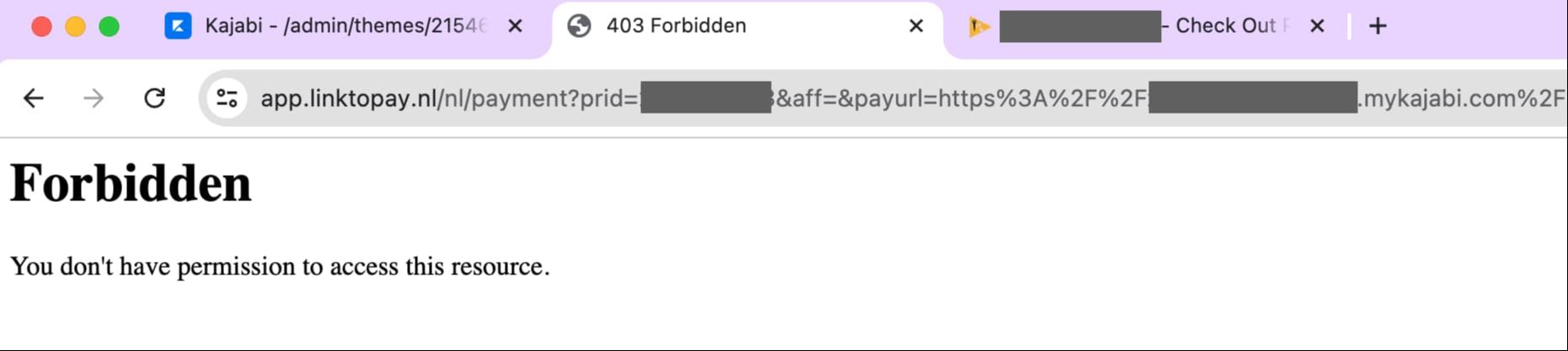
403 Forbidden error during payment
Forbidden: You don't have permission to access this resource.
Help topics: Connect Offers · Troubleshooter · Add people manually · General FAQ
When does this error happen?
- You link directly to your Linktopay checkout page in a broadcast or email sequence.
- A partner links directly to your checkout with a referral code in the URL (?ref=somename).
- You preview the page in admin mode and try to pay.
If one of these applies to you, take action below. In other cases no action is needed, but we still recommend using the latest version of the Linktopay checkout.
What causes it
In July 2024 Kajabi changed the tracking code it adds to links in broadcasts and email sequences. When a client clicks such a link, the tracking code is carried over to the Linktopay checkout page and conflicts with Linktopay. This causes a 403 error during payment.
You can recognize it when the checkout URL in the browser contains a code like ?cid=3dbc762e-ecef-4d45-a3a3-0c55c1f61236.
How to solve it
Option 1 (recommended): use the latest Linktopay checkout (v5.5.0 or higher)
The latest template prevents this error and supports the latest Kajabi features, such as social icons and widgets. Download it from the lesson Download Linktopay Checkout in Linktopay Setup.
Download Linktopay checkoutOption 2 (workaround): link to a sales page first
The problem only occurs when an email links directly to a Linktopay checkout page. Link to a sales page instead and use a buy button to the checkout page. You may already work this way.
Option 3 (quick fix): update existing checkout pages (v5.1.0 and older)
Add a small script to your Linktopay checkout pages that removes the tracking code:
Website > Landing pages > Customize your Linktopay checkout page > Settings (top of the sidebar) > Custom code > Custom JavaScript > paste the code below > Save
Code updated on 20 August 2024
/* Removes email tracking query and refreshes the page */
window.addEventListener('load', function() {
  var url = window.location.href;
  if (!url.includes('editor=true')) {
    if (url.includes('?cid')) {
      window.location.href = url.split('?')[0];
    }
  }
});
/* End tracking query */
Need help? Follow the steps in this video.