
Mollie error 422
Error executing API call (422: Unprocessable Entity): No suitable payment methods found.
Help topics: Connect Offers · Troubleshooter · Add people manually · General FAQ
What you see

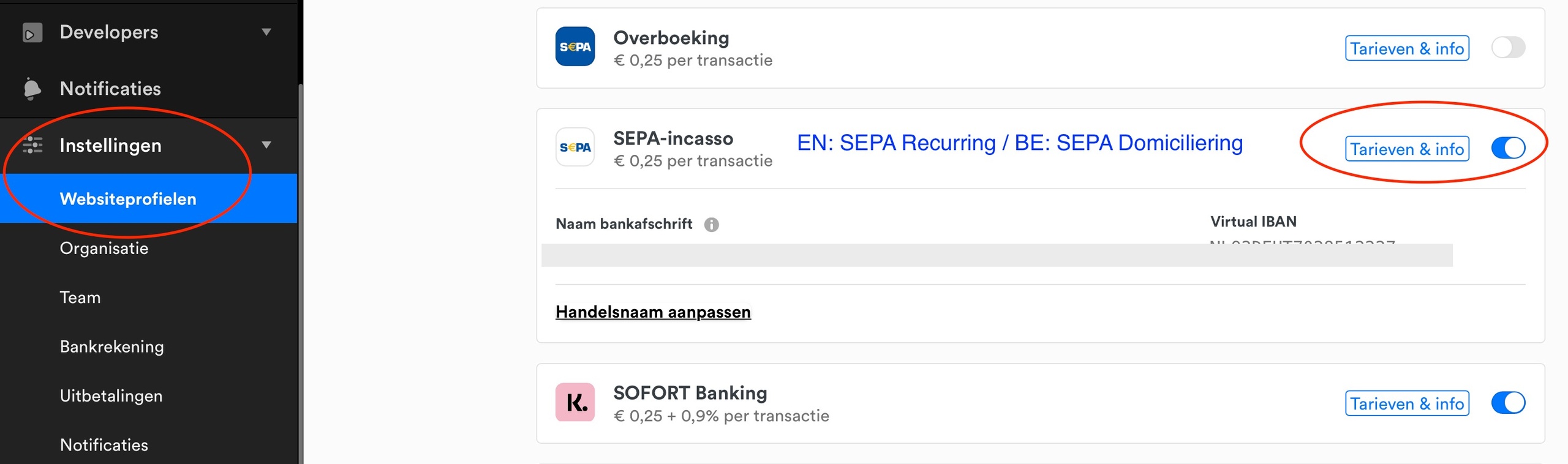
Solution: activate SEPA Direct Debit in Mollie
This is not a Linktopay error. Recurring payments with iDEAL | Wero or Bancontact only work when SEPA Direct Debit is active, or with credit cards.
- In your Mollie Dashboard, click your organisation name at the top left, open Organisation settings and choose Payment methods.
- Click the + next to SEPA Direct Debit (Dutch: SEPA-incasso, Belgium: SEPA-domiciliëring).
- Wait 3 to 5 days: Mollie checks this method separately. If Mollie asks for more information, tell them you need SEPA Direct Debit for recurring payments with Linktopay.
Error 422 on a single payment? Then your Mollie account is probably inactive after a long period without sales. Contact Mollie to reactivate it.
Payment limits
- By default, Mollie accepts credit card payments up to €10,000 per transaction.
- SEPA Direct Debit payments are limited to €1,000 per transaction by default. Mollie support can raise this to a maximum of €5,000.
Need higher amounts for SEPA Direct Debit? Contact Mollie support. Read more at Mollie.